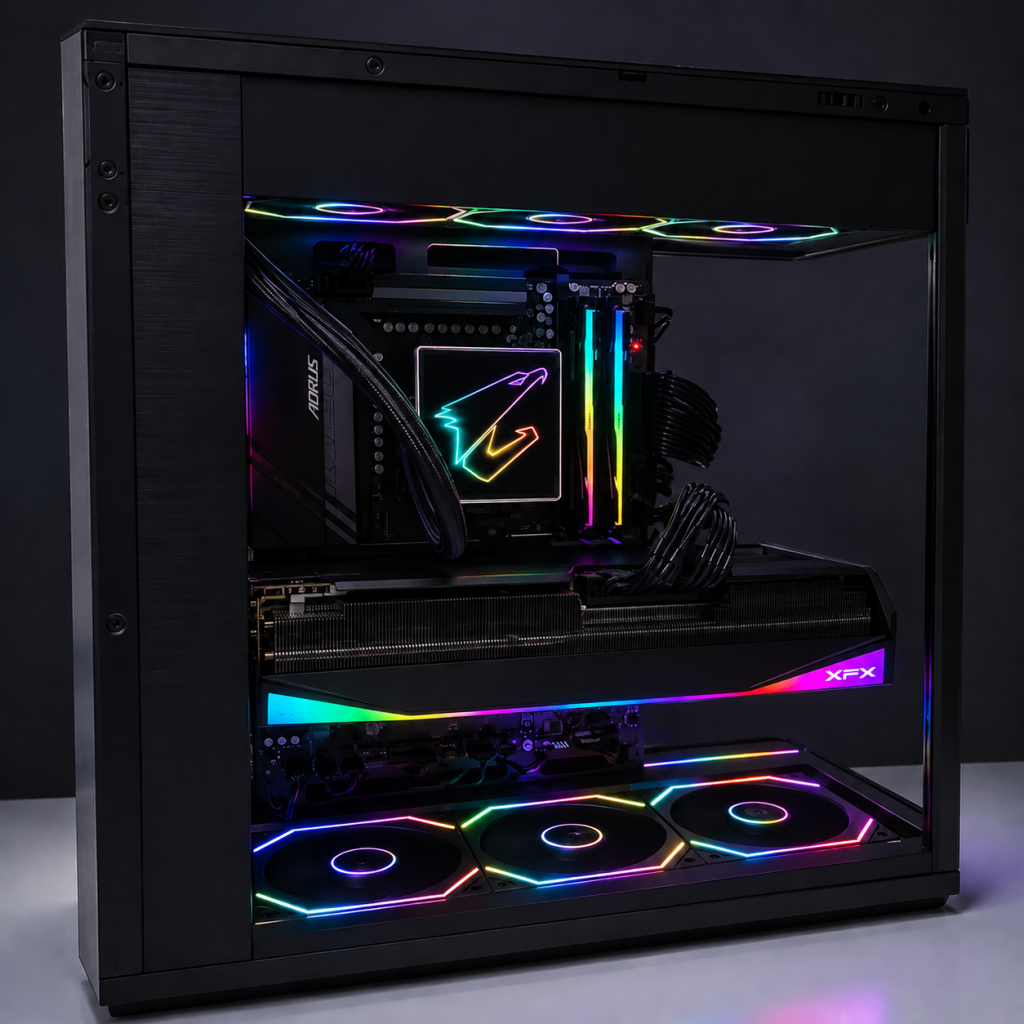
For many years, gaming for me meant gaming laptops. I enjoyed the convenience of having everything in one machine and had never seriously considered building a desktop PC myself. That changed when a friend told me how different the gaming experience could be on a properly configured desktop. I was intrigued, and in April 2026, I approached a nearby PC shop for a proposed gaming PC built around the Radeon RX 9070 XT. The configuration was already quite capable, and my original intention was simply to place the order and let the shop handle everything. Instead, I went home and started looking at the individual components. That small decision eventually changed the entire plan.
The more I compared the components, the more questions I had. I began wondering whether I could choose better parts while keeping the overall cost under control. What started as casual price checking gradually became a much deeper exploration of processors, graphics cards, motherboards, memory, storage, power supplies and cooling. I learned that two components carrying apparently similar specifications could differ considerably in their design and positioning. Memory running at the same DDR5-6000 speed, for example, could have different timings, while two RX 9070 XT graphics cards could belong to different product tiers despite using the same GPU. Building a PC, I discovered, was less about selecting the most expensive parts and more about deciding which improvements were worth paying for.
Eventually, my own configuration began to emerge. I retained the Phanteks Evolv X2 case because its clean showcase design was exactly what I wanted, but much of what went inside changed. I selected an XFX Mercury RX 9070 XT and paired it with a Ryzen 7 7800X3D. The motherboard became a full-size Gigabyte Aorus Elite B850 WiFi7, accompanied by G.Skill Trident Z5 Neo RGB DDR5-6000 CL28 memory, a Samsung 990 Pro SSD and a Corsair RM850e power supply. I deliberately chose a more economical Jungle Leopard Pro Flow 360 for cooling and added matching ARGB fans. By deciding where I was willing to spend more and where I could reasonably spend less, I was ultimately able to save money while upgrading several of the components that mattered most to me.
By this point, another thought had emerged: if I had already selected every component myself, why not build the PC myself as well? The actual build was completed through 20 steps, beginning with preparing the case and installing the CPU, RAM, SSD, fans, motherboard, power supply, AIO cooler and graphics card. From there, the process continued to the first power-on, BIOS configuration, Windows installation, system checks, game testing and final assembly. Breaking the build into a clear sequence made an otherwise intimidating task much more manageable and gave me a structured way to check each stage before moving on.
The assembly itself was considerably more intimidating than choosing the parts. Watching someone install a processor in a video is very different from holding an expensive processor above the socket yourself. I worked slowly, frequently referring to manuals and checking connections before proceeding. Cable management proved more time-consuming than I had expected, and identifying the various motherboard headers reminded me how little I had known about the inside of a desktop PC only a few months earlier. There were moments when I stopped simply because I was not sufficiently confident about the next step. Rather than forcing anything, I checked again.
Eventually, there was nothing left to install. I connected the monitor and reached for the power button. This was probably the most nerve-racking moment of the entire project. After all the research, purchases and hours of assembly, there remained the uncomfortable possibility that pressing the button would produce absolutely nothing. Instead, the fans began to spin, the RGB lighting came alive, and the system started. Watching the machine boot for the first time was surprisingly satisfying. Until that moment, everything had existed separately. Now the components were functioning as a single system that I had assembled myself.
The first successful boot was not quite the end. BIOS settings had to be checked, Windows installed, drivers configured, storage verified, temperatures monitored and the system tested in actual games. These final stages were important because a PC that powers on is not necessarily a PC that is fully stable. Troubleshooting became another part of the experience, and the process felt unexpectedly familiar. When something did not work, the sensible approach was to identify the possible causes, change one thing at a time, observe the result and gradually eliminate explanations. The context was very different from academic research, but the underlying logic was remarkably similar.
Looking back, I began this journey simply because I wanted to experience desktop gaming after years of using gaming laptops. I ended it having learned far more than I expected about the machine itself. The finished PC is certainly faster and more powerful than what I had used before, but that is no longer the part of the project I find most interesting. What I remember instead is the progression from knowing very little about PC assembly, to questioning individual component choices, to selecting my own configuration, and finally to pressing the power button on a machine that I had put together myself.
Sometimes a new learning experience begins with something very ordinary. In my case, it began with a friend telling me that I should try gaming on a desktop PC. A few months later, there was one sitting on my desk, built with my own hands.